
Featured image: Person using a calculator and laptop for accounting. Photo by Karolina Grabowska on Pexels (Free to use).
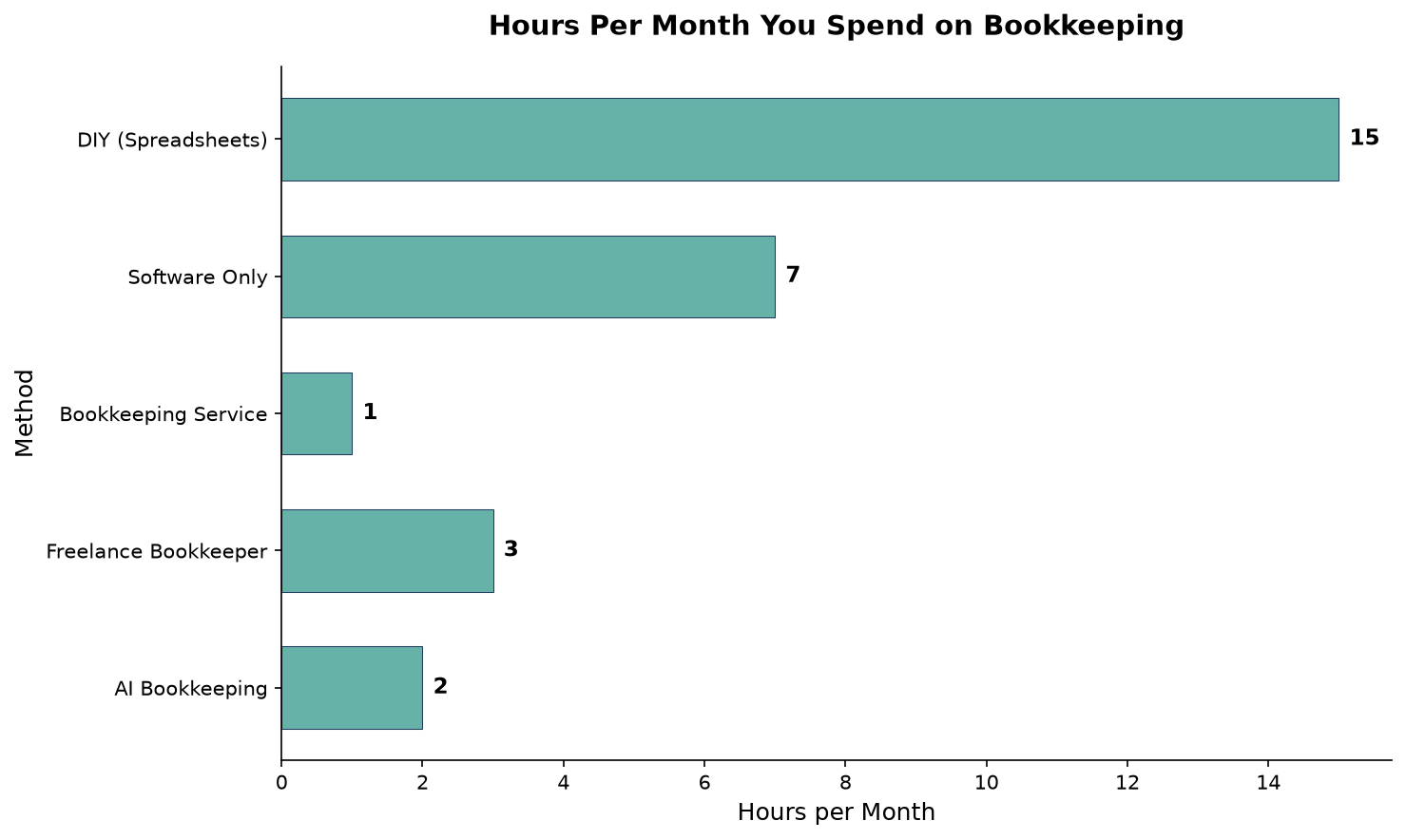
If you run a small business and still do your books by hand — or even in QuickBooks with manual entry — you are spending roughly 5 to 15 hours per month on work that AI can handle in under 2.
The accounting software you already use likely has AI features you have not turned on. And the market has shifted: 58% of small businesses now use AI-powered accounting tools, up from 35% just two years ago. Those who have adopted AI save an average of 10 hours per month and cut bookkeeping costs by 40 to 50%.
This article compares the three major platforms — QuickBooks Online, Xero, and FreshBooks — along with DIY and outsourced alternatives, using real pricing data, time savings benchmarks, and adoption statistics from Intuit, Karbon, Eagle Rock CFO, and industry surveys. The goal is to give you a concrete framework for deciding whether AI accounting is worth it for your business — and if so, which tool to choose.
How Big Is the AI Accounting Market in 2026?
The AI in accounting market was valued at $7.6 billion in 2025 and is projected to reach $11 billion in 2026, growing to $302 billion by 2035 at a 44.5% CAGR. This is not abstract growth — it reflects real products that directly affect what you pay and how much time you spend on bookkeeping.
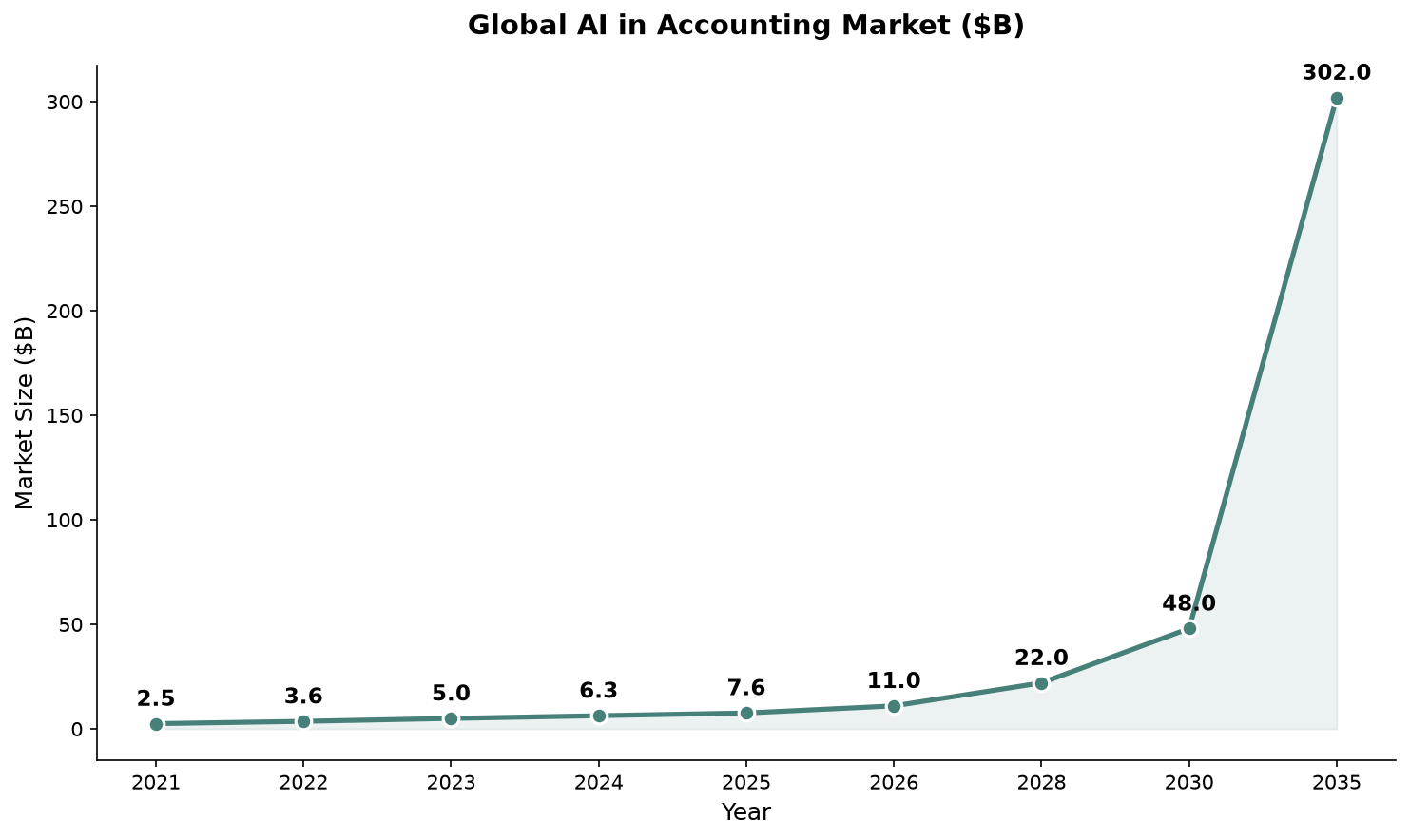
The software segment dominates at 75% of market revenue, driven by cloud-based platforms that automate high-volume repetitive tasks. Three companies control the small business segment: Intuit (QuickBooks), Xero, and FreshBooks. All three have invested heavily in AI over the past 18 months, and the gap between what their AI can do and what most business owners actually use is the main opportunity this article addresses.
How Much Time Does AI Bookkeeping Actually Save?
The headline number: 10 hours per month — that is the average saving reported by small businesses using AI bookkeeping features, based on Intuit’s 2025 research across 2,000 U.S. small business owners. For businesses with higher transaction volumes (100+ per month), savings reach 16 to 18 hours.
Karbon’s 2026 State of AI in Accounting report, surveying nearly 600 accounting firms across six continents, found that firms using AI save an average of 60 minutes per employee per day — roughly 21 hours per month per employee. At the individual business level, Thomson Reuters Institute research puts annual time savings at 180 to 200 hours per professional.
Breakdown of where the time goes:
| Task | Manual Time | AI-Assisted Time | Savings |
|---|---|---|---|
| Transaction categorization | 4-6 hrs/mo | 0.5-1 hr/mo | 85-90% |
| Bank reconciliation | 3-5 hrs/mo | 0.5-1 hr/mo | 70-80% |
| Receipt processing | 2-3 hrs/mo | 10-20 min/mo | 85-95% |
| Invoice generation & follow-up | 2-4 hrs/mo | 30 min/mo | 75-85% |
| Financial report preparation | 2-3 hrs/mo | 15-30 min/mo | 80-90% |
| Total | 13-21 hrs/mo | 1.5-3 hrs/mo | 85-90% |
The accuracy improvement is equally significant. AI-powered categorization achieves 85-95% accuracy on the first pass (QuickBooks: 85-90%, Xero JAX: 82% auto-match on reconciliation), compared to manual error rates of 1-8% depending on complexity. SolveXia’s 2026 Finance Automation report found that AI reconciliation reduces error rates to 0.5% — roughly 10× better than manual processing.
Is DIY Bookkeeping Really Cheaper Than AI Accounting?
“DIY bookkeeping is free” is the most expensive myth in small business finance. The software subscription is cheap ($0 to $80/month), but the owner’s time is not.
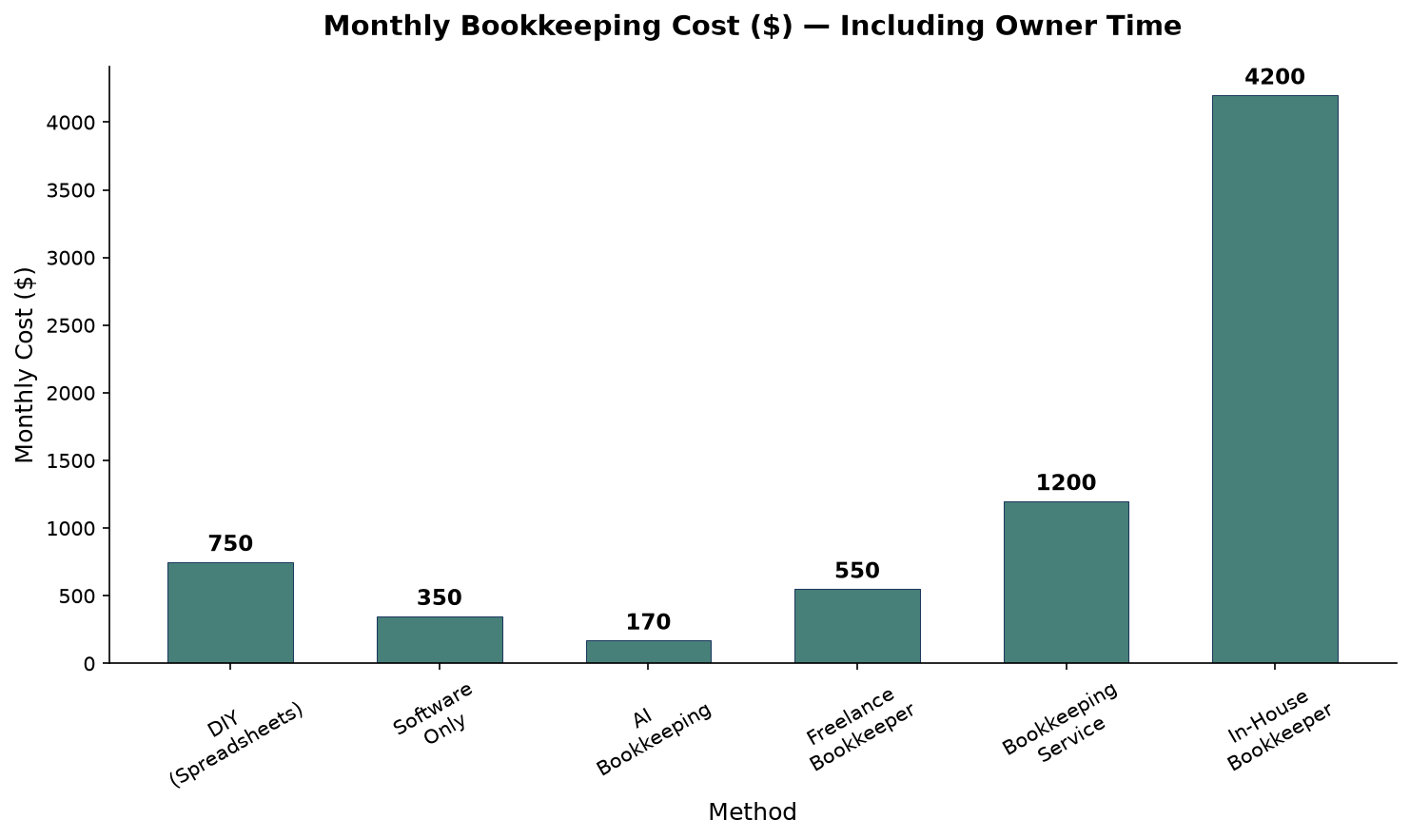
A detailed breakdown of bookkeeping costs in 2026:
| Method | Software/Tool Cost | Time per Month | Opportunity Cost ($50/hr) | Total Monthly Cost |
|---|---|---|---|---|
| DIY spreadsheets | $0 | 15 hours | $750 | $750 |
| Software only (QuickBooks/Xero) | $30-$80 | 7 hours | $350 | $380-$430 |
| AI bookkeeping tool | $99-$249 | 2 hours | $100 | $199-$349 |
| Freelance bookkeeper | $300-$800 | 3 hours | $150 | $450-$950 |
| Full bookkeeping service | $500-$2,500 | 1 hour | $50 | $550-$2,550 |
| In-house bookkeeper | $3,500-$5,500 | 0 hours | $0 | $3,500-$5,500 |
Key insight: AI bookkeeping is the cheapest option for most small businesses once you factor in the owner’s time. At $99-$249/month with only 2 hours of your time, the total cost ($199-$349) undercuts every other method — including DIY, because your time is worth something.
The average small business owner spends 240 hours per year on manual bookkeeping. At a modest $50/hour valuation, that is $12,000 per year in time alone — more than the annual cost of a bookkeeping service or AI tool by a wide margin.
How Do QuickBooks, Xero, and FreshBooks Compare?
All three platforms have invested heavily in AI. Here is how they compare in 2026.
QuickBooks Online — The Most Accurate AI Categorization
QuickBooks Online is the market leader and the safest choice for most small businesses. Its AI, called Intuit Assist, offers specialized agents for accounting (auto-categorization at 85-90% accuracy after 2-3 months of learning), tax optimization, customer follow-ups, payment strategies, and payroll.
Pricing (2026):
| Plan | Monthly Price | Users | Best For |
|---|---|---|---|
| Simple Start | $38 | 1 | Solo owners |
| Essentials | $75 | 3 | Small teams |
| Plus | $115 | 5 | Product-based businesses |
| Advanced | $275 | 25 | Scaling companies |
Payroll is a separate add-on starting at $50/month. The ecosystem advantage matters: QuickBooks integrates with 750+ apps and has the largest network of certified ProAdvisors in the US. Most accountants already know QuickBooks.
What it does well: Best-in-class AI transaction categorization. Intuit Assist lets you ask questions about your finances in plain English. Inventory tracking (Plus plan and above) is the best of the three. 14,000+ bank connections.
What it struggles with: Most expensive option. Interface has grown complex. Aggressive upselling for add-ons. Basic AI features are included, but advanced AI agents require higher-tier subscriptions.
Verdict: Best for product-based businesses and anyone who works with a QuickBooks-fluent accountant.
Xero — The Best Value with Unlimited Users
Xero took a different approach by building JAX (Just Ask Xero) as a unified AI layer across the entire platform. Built in partnership with Anthropic and OpenAI, JAX handles bank reconciliation (82% auto-match accuracy), cash flow prediction, payment reminders, expense claims, and natural-language financial report queries.
Pricing (2026):
| Plan | Monthly Price | Key Limits | Best For |
|---|---|---|---|
| Starter | $25 | 20 invoices/mo | Testing, micro businesses |
| Growing | $55 | Unlimited invoices | Small teams |
| Established | $90 | Multi-currency, analytics | Growing businesses |
The critical difference: every Xero plan includes unlimited users at no extra cost. For a five-person team, Xero Growing at $55/month is dramatically cheaper than QuickBooks Plus at $115/month plus per-user fees. JAX is included on all plans.
What it does well: Unlimited users on every plan. JAX is genuinely impressive at reconciliation and cash flow forecasting. Clean, modern interface. Best multi-currency support of the three. 1,000+ app integrations.
What it struggles with: No built-in US payroll (requires Gusto integration). Reporting is less flexible than QuickBooks. Starter plan’s 20-invoice limit is too restrictive for most businesses.
Verdict: Best for teams, international businesses, and cost-conscious owners who want the best AI-to-price ratio. For a broader look at how automation transforms business operations, see our getting started with AI automation guide.
FreshBooks — The Freelancer’s Choice
FreshBooks has not tried to build a general-purpose AI assistant. Instead, it focused AI investment on the two workflows that matter most to its core users: invoicing and expense management. The invoicing AI suggests line items based on past invoices, auto-fills client details, and can generate a complete invoice from a short description of work performed.
Pricing (2026):
| Plan | Monthly Price | Key Limits | Best For |
|---|---|---|---|
| Lite | $23 | 5 billable clients | Solo freelancers |
| Plus | $43 | 50 billable clients | Growing freelancers |
| Premium | $70 | Unlimited clients | Service businesses |
All AI features are included on all paid plans. FreshBooks users get paid 11 days faster on average compared to manual invoicing.
What it does well: Fastest invoicing AI of the three. Best time-to-invoice workflow for service providers. Easiest interface for non-accountants. Strong mobile app.
What it struggles with: Not double-entry accounting at its core — problematic past $500K revenue. No inventory tracking. Minimal multi-currency support. Small integration library (~100 apps). Per-team-member fees add up.
Verdict: Best for freelancers, consultants, and service providers who bill by hour or project.
How Accurate Is AI Accounting Compared to Manual Bookkeeping?
| Platform | AI Feature | Accuracy | Notes |
|---|---|---|---|
| QuickBooks Online | Intuit Assist categorization | 85-90% | Learns from corrections over 2-3 months |
| Xero | JAX auto-match reconciliation | 82% | Harder task: matching to specific invoices |
| FreshBooks | AI invoice suggestions | Adequate | Less sophisticated than QBO or Xero |
| Industry average | AI transaction coding | 90-95% | SolveXia 2026 benchmark |
| Industry average | AI bank reconciliation | 70%+ | First-pass auto-match |
| Industry average | AI receipt processing | 91% | OCR-based first-pass capture |
| Manual processing | Human data entry | 92-99% | Error rate: 1-8% depending on complexity |
Adoption: How Fast Are Small Businesses Moving to AI Accounting?
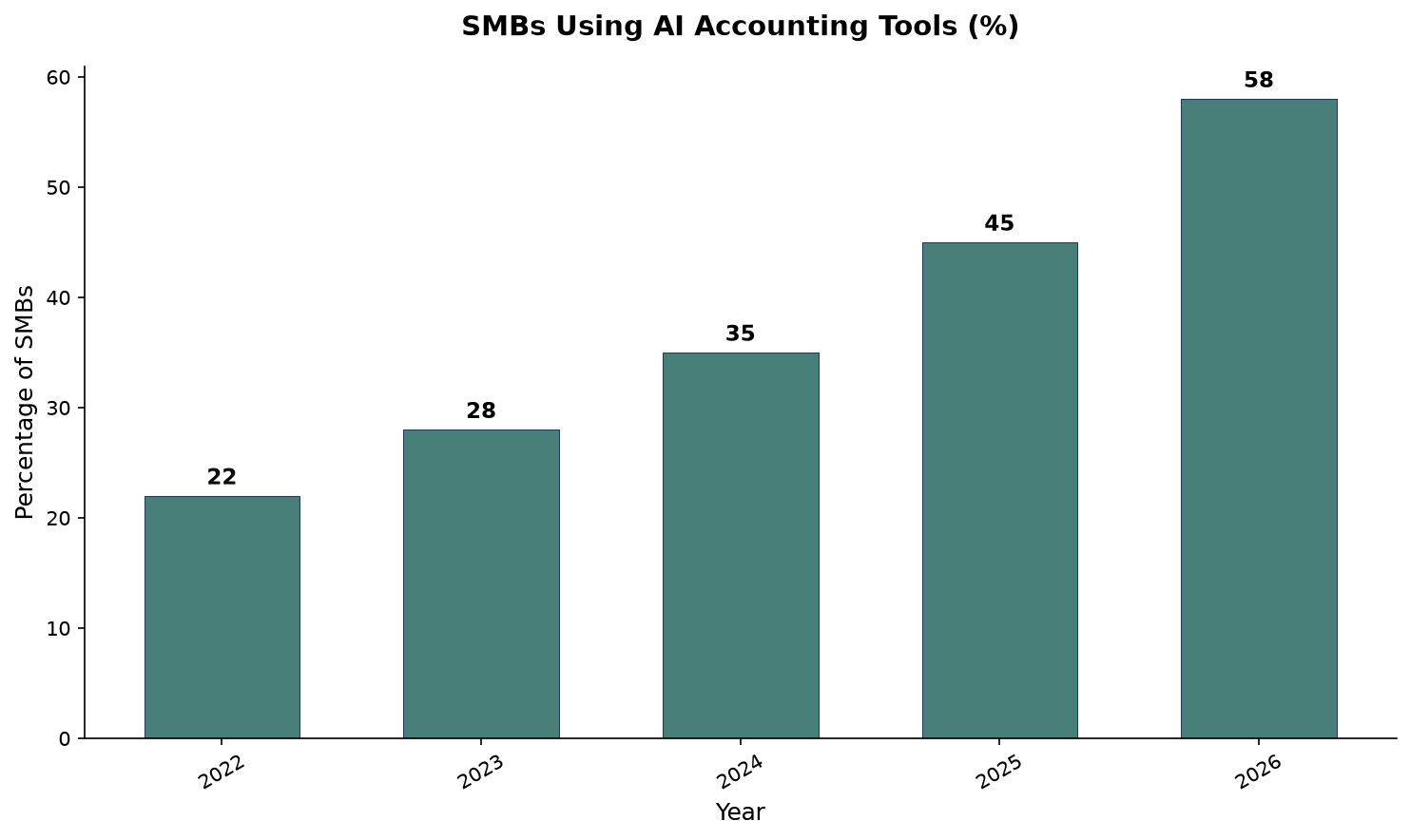
The adoption curve has steepened sharply. In 2024, roughly 35% of small businesses used AI accounting tools. By early 2026, that figure has reached 58%.
Key adoption milestones in 2026:
- 58% of small businesses now use AI accounting tools (Finntree 2026 report), consistent with broader AI adoption trends across industries
- 68% of US small businesses use AI regularly across all functions (Intuit QuickBooks 2026 AI Impact Report, 34,000+ respondents)
- 45% actively use AI features within bookkeeping software, up from 28% in 2024 (Intuit 2025 research)
- 98% of accounting firms now use AI, with most using it daily (Karbon 2026 State of AI in Accounting)
- 41% of AI-using small businesses report higher revenue because of AI
- 74% say AI makes them more productive, up from 46% in mid-2024
- 24% of AI-using owners say their workdays are shorter (vs 11% who say longer)
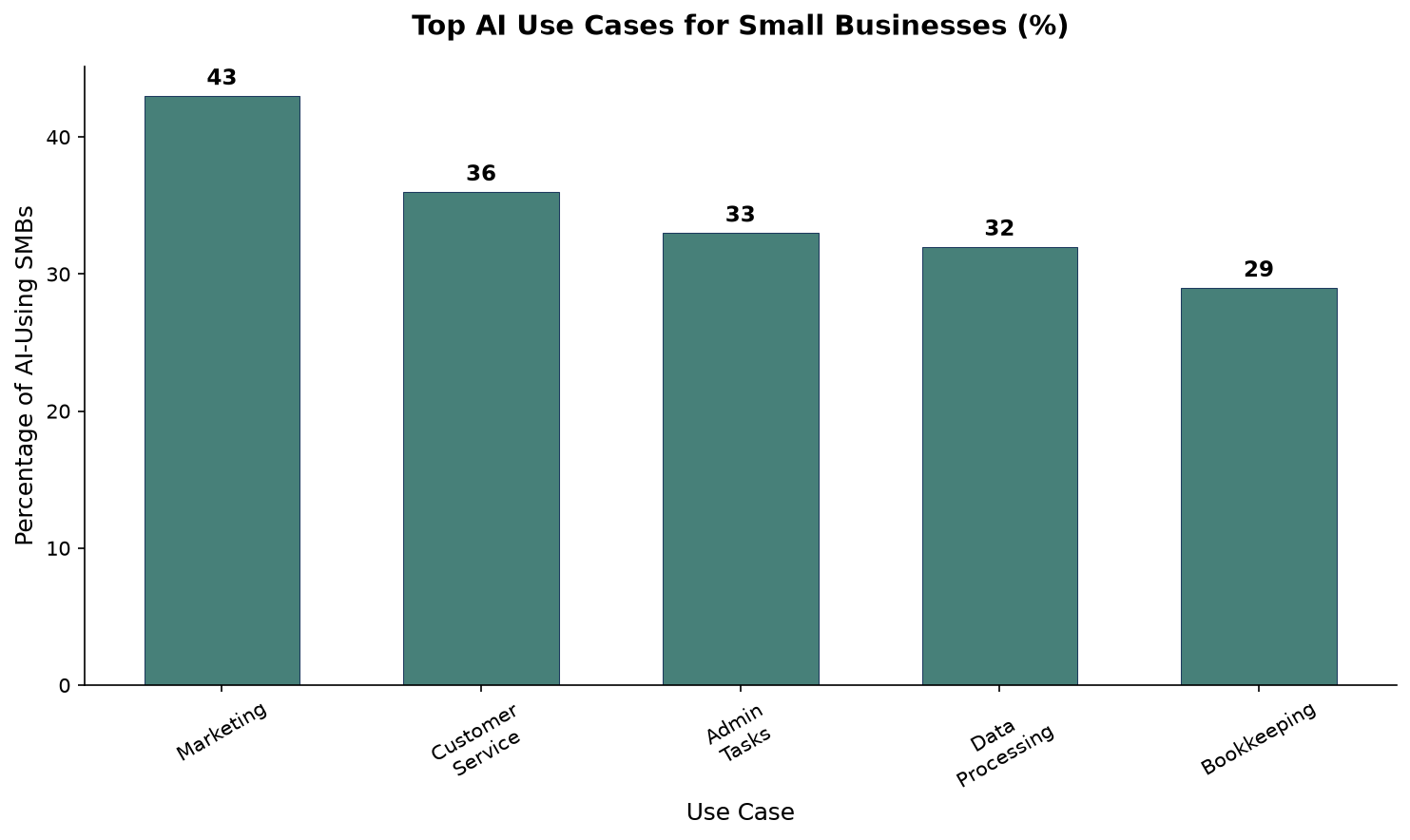
Bookkeeping is the fifth most common AI use case among small businesses at 29%, behind marketing (43%), customer service (36%), administrative tasks (33%), and data processing (32%).
The ROI timeline is well established. Companies implementing AI accounting tools typically achieve full ROI within 10 to 14 months. The value breaks down as: labor efficiency 40-50% of total ROI, error reduction 20-30%, and improved cash flow management 20-30%.
How to Implement AI Accounting: A Practical 30-Day Framework
Switching from manual bookkeeping to an AI-assisted workflow does not happen overnight. Based on adoption patterns from businesses that successfully made the transition, here is a structured approach that minimizes disruption.
Week 1: Assessment and Setup
Begin by auditing your current process. Count how many transactions you process per month, how many invoices you send, and how many receipts you collect. This baseline will let you measure ROI later. Then connect your bank accounts and credit cards to your chosen platform — QuickBooks supports 14,000+ bank connections, Xero covers most major institutions, and FreshBooks connects to standard business accounts. Enable automatic bank feed synchronization immediately; this is the single highest-impact change you can make. Most users see bank feeds matching 80-90% of transactions on the first sync, eliminating the most tedious manual entry task.
Week 2: Train the AI on Your Business
During the second week, focus on corrections rather than volume. Review every transaction the AI categorizes and correct any mistakes. QuickBooks’ Intuit Assist learns from corrections over 2-3 months, but the learning curve accelerates if you provide 50-100 corrected examples in the first week. Xero’s JAX improves its reconciliation matching as you confirm or override its suggestions. Key areas to audit: expense categories (is that software subscription under “Software” or “Professional Fees”?), vendor names (consistency matters for tax reporting), and sales tax classifications if applicable.
Week 3: Automate Recurring Workflows
With bank feeds syncing and the AI trained on your categories, turn on automation for recurring tasks. Set up rules for regular expenses — rent, subscriptions, utilities — so the AI categorizes them without review. Configure invoice templates with auto-send and auto-follow-up reminders. QuickBooks and FreshBooks both support recurring invoice automation with payment reminders at intervals you define. Enable receipt scanning via mobile app: photograph receipts as you receive them, and the AI extracts the amount, date, vendor, and category automatically.
Week 4: Establish a Review Cadence
AI does not eliminate review; it changes its frequency and depth. Instead of spending 10-15 hours per month on bookkeeping, spend 30 minutes per week reviewing AI-suggested categorizations, monitoring cash flow reports, and checking that reconciliations are complete. Schedule a monthly 30-minute “books health check” to review profit and loss statements, review accounts receivable aging, and flag any anomalies the AI may have missed. Businesses that maintain this review cadence report the highest satisfaction with AI accounting tools.
The full transition typically takes 4-6 weeks, after which users report 80-90% reduction in time spent on bookkeeping. The key failure mode is skipping the training phase — businesses that let the AI run without corrections in the first two weeks see accuracy plateau at 60-70% rather than reaching the 85-95% benchmark. A common mistake is attempting to automate too many workflows simultaneously; the most successful adopters automate one process at a time (bank feeds first, then invoicing, then receipt processing) and stabilize each before moving to the next.
Businesses that complete the full implementation framework also report secondary benefits beyond time savings: fewer late payment penalties (automated reminders reduce overdue invoices by 30-40%), cleaner tax filings (AI-categorized transactions require 50-70% less manual review during tax season), and improved cash flow visibility (real-time dashboards replace end-of-month surprises). These compound returns make the 4-6 week investment worthwhile for most small businesses. The businesses that see the fastest ROI are those that treat the implementation as a process change rather than a software install — assigning one person to own the transition and setting measurable milestones for each phase.
Which Option Should You Actually Choose?
The right choice depends on three factors: your transaction volume, whether you have employees, and how much you value your own time.
You have fewer than 50 transactions per month and are comfortable with software: Use QuickBooks Simple Start ($38/month) or Xero Starter ($25/month). Turn on the AI features — auto-categorization, bank feed matching — and you will save 3-5 hours per month vs doing everything manually.
You have 50-300 transactions per month and value your time at $50+/hour: An AI bookkeeping tool at $99-$249/month is your cheapest option. It saves 8-12 hours per month and costs less than the opportunity cost of DIY.
You have 100-300 transactions and need clean books for tax time without touching them: Hire a freelance bookkeeper at $300-$800/month. You will spend 1-2 hours per month reviewing rather than doing.
You have 300+ transactions, employees, or inventory: QuickBooks Plus or Xero Established, paired with a bookkeeper or AI service. The complexity of payroll, AP/AR, and inventory tracking justifies professional support.
You are a freelancer or solo consultant: FreshBooks Lite ($23/month) or Plus ($43/month). The invoicing AI alone will save you more time than the subscription costs.
You have a team of 3+ who need access: Xero Growing ($55/month) with unlimited users is the strongest value proposition in small business accounting in 2026.
Frequently Asked Questions
Data sources: Precedence Research (market size), Finntree 2026 AI in Accounting Report (adoption), Intuit QuickBooks 2026 AI Impact Report (34,000+ respondents, adoption & ROI), Eagle Rock CFO 2026 AI Adoption Report (SMB accounting AI), Karbon 2026 State of AI in Accounting (firm adoption), BookkeepingFlow (bookkeeping costs), CostPrism (bookkeeping cost calculator), Catalyst CPA (bookkeeping pricing), SolveXia 2026 Finance Automation Report (accuracy benchmarks). Additional platform pricing verified from QuickBooks, Xero, and FreshBooks official pricing pages as of July 2026. All dollar figures in USD.